One prompt.
One compiled desktop app.
From an idea to a shareable installer — entirely on your machine.
Operator X02 turns engineering ideas into finished native tools — not just generated code.
Describe the app you want. Operator X02 scaffolds it, generates the code, compiles it with cargo and Tauri, and hands you a real Windows .exe and installer — without leaving the editor, and without touching a cloud.
A sentence goes in. An installer comes out.
No terminal gymnastics, no packaging config, no per-OS build scripts.
Build Mode runs the whole compile-and-bundle pipeline for you.
Windows installers ship today. The Linux pipeline already packages — see platform status.
Hand you source code, or a web app hosted in someone else's cloud. You still open a terminal and figure out packaging for every OS yourself.
Hands you a file a user can double-click to install — Windows and Linux from the same prompt, compiled locally, offline.
One sentence. Sixteen files. One installer.
This is Build Mode compiling NoteApp — a real Tauri + React desktop app — from a single prompt. Not a mockup of the IDE. The actual IDE.
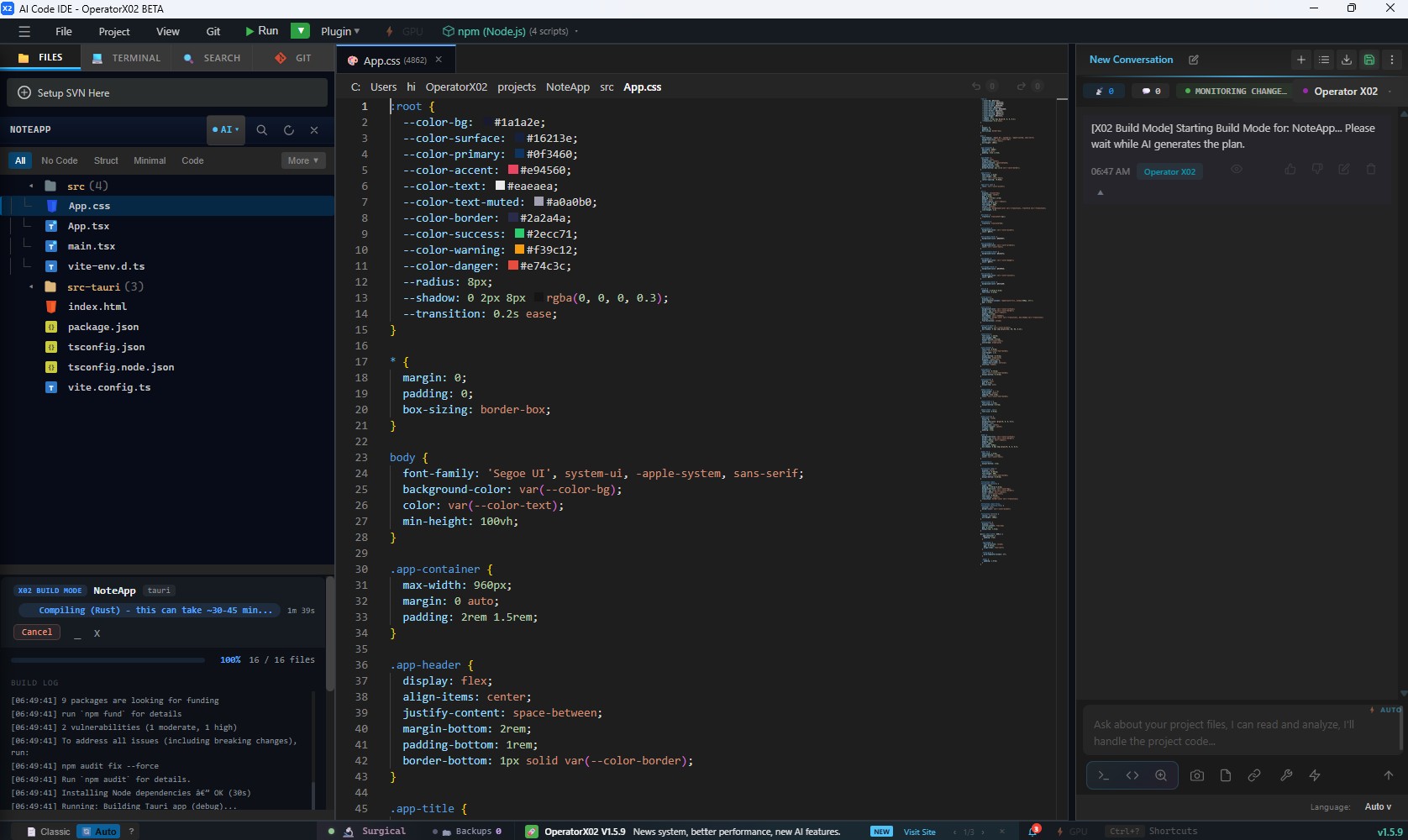
You typed one line. Build Mode wrote a whole project: a React front end, a Tauri Rust shell, and every config file that ties them together — then started compiling it into something you can install.
index.html→main.tsx→App.tsx→App.css
wrapped by src-tauri/ → compiled to a native binary
written & wired
pulled & compiled locally
the thing you ship
The gigabytes are the build, not the app — the Rust toolchain, npm packages and cargo crates compiled on your machine. That work is why a cold build takes the 30–45 minutes you see, and why the installer that comes out is only a few megabytes. Figures are typical for a Tauri release build and vary with the project and machine.
Build Mode — the whole workflow, one flow.
Not a code generator with extra steps. The path from a sentence to something a colleague can install runs end to end, on your machine, in the editor you already have open.
- 01Ideaa tool the bench needs today
- 02Promptone line, plain English
- 03Projectscaffold + Tauri config
- 04Codemulti-file, backed up first
- 05Compilecargo · release build
- 06Installer.exe + .msi, ready to hand over
Six steps you used to run by hand. Now one.
What the IDE does while you wait.
The target is detected from your sentence, the project tree is created, and the Tauri config is written for you.
Multi-file generation through the same surgical edit pipeline the rest of the IDE uses. Every write is backed up first.
A real release build. Cold Rust compiles are slow, so the panel shows a moving bar and a live clock rather than a frozen 100%.
Out comes a signed-by-nobody, double-clickable Windows binary and an installer you can hand to someone who has no toolchain.
Prompt in. Installer out. Nothing left the machine.
Generating code is the easy part.
The gap between a good answer and a running application is six manual steps long. Build Mode closes it. No competitor named — this is a comparison of workflows, not of products.
| Capability | Code-generation workflow | Build Mode |
|---|---|---|
| Generate the code | ✓ | ✓ |
| Create the project | Partial | ✓ |
| Resolve the build pipeline | Manual | ✓ |
| Compile an executable | Manual | ✓ |
| Package an installer | Manual | ✓ |
| Runs with no network | ✕ | ✓ with a local model |
Build Mode itself never calls out. Code generation uses whichever AI provider you configured — point it at a local model and the whole pipeline runs offline.
Four routes, no guessing.
A build request now opens a card with four routes instead of the IDE deciding for you. Choose one to see what it does.
Because a browser cannot open a COM port.
Most AI tools generate web apps. Engineering tools need to touch the machine they run on.
Engineering tools need direct access to hardware — and often to no network at all. That is why Build Mode compiles native desktop applications, not pages that ask a browser for permission.
Not just demos.
Five tools, one afternoon each.
Live-plots a COM port and logs to CSV. No Python environment to set up on the bench machine.
Hardware accessParses .blf and .asc logs offline. Vehicle data never leaves the laptop.
A small native binary with live gauges, light enough to run on the edge device it is watching.
Edge hardwareAn installer a technician double-clicks. No toolchain, no Node, no README on the production floor.
Hand-offCSV in, charts out, limits checked, PDF signed off. Fully offline, which is usually the requirement.
OfflineWhatever the bench needs on Tuesday.
Described in one line.
A tool you can hand to someone who has no toolchain.
Windows today. Linux in progress. macOS next.
The same Build Mode, the same prompt — three sets of native installers. Here's exactly where each one stands.
The main product, in daily use. Download, run, and build native apps from a prompt right now.
Backend builds clean; .deb + .rpm already package. Verifying the desktop window on real Linux before we call it ready.
On the roadmap. The cross-platform core is already in place — macOS bundling follows once Linux ships.
v1.5.9.1a ships Windows installers only. Linux and macOS builds land in their own releases — watch the repo.
Download an installer.
No build required. Every feature is included — there is no paid tier and no account.
Download the .exe or .msi from GitHub. Open the release page above (or use the Download button) to grab the installer you need. Windows SmartScreen may appear. Click More info → Run anyway. This is expected for unsigned indie apps — the binary is built from the MIT-licensed source in this repository, and you are welcome to build it yourself instead.
One release in a longer argument.
Operator X02 is not accumulating features. Each release adds one thing an engineering IDE needs and a general-purpose one does not — and two more are already taking shape.
The AI remembers your architecture, your hardware and the reason behind every decision. Read more →
It can now turn what it knows into a compiled, installable application — without leaving the editor.
In active development. If you have ever fought a terminal to talk to a board, you will want this one.
Memory and Build Mode were the first two moves. What they add up to is still under wraps — for now.
The last two are direction, not a dated commitment. The roadmap lives on GitHub.
Stop generating code.
Start generating software applications.
Describe the tool. Ship the application. Free forever, MIT licensed — no account, no telemetry, no cloud lock-in.
✓ MIT License · ✓ No account · ✓ Runs offline · ✓ Windows 10 / 11