Features Demo Workflow Telemetry Phases ★ GitHub ⬇ Download Free
V1.5 · NEW RELEASE MARCH 2026

Code the
Edge.
Deploy to Jetson.

Operator X02 now speaks NVIDIA. SSH into your Jetson Orin, watch GPU telemetry in real-time, deploy CUDA kernels, and get AI-assisted edge computing — all without leaving your IDE.

SSH
Direct Connect
Real-time
Tegrastats
CUDA
Deploy Support
95
MB IDE Footprint
AI Code IDE — OperatorX02 BETA · Jetson Phase 2 LIVE
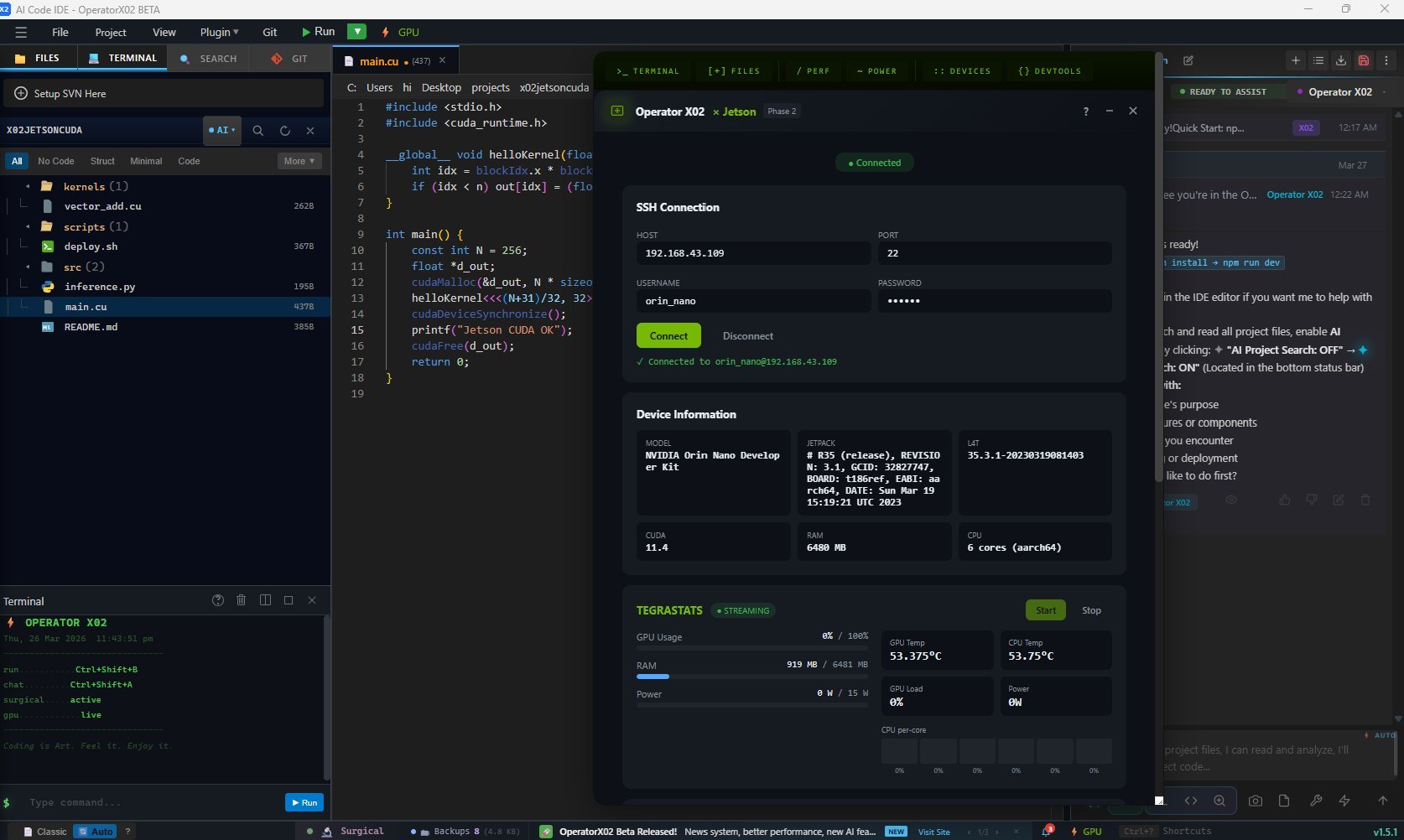
Operator X02 IDE — Jetson Panel with SSH connection, Device Info, and Tegrastats live streaming
ORIN NANO · SSH 192.168.43.109 · TEGRASTATS STREAMING · v1.5.1
Tested On
Orin Nano TESTED
Orin NX TESTED
AGX Orin TESTED
Xavier NX PLANNED
Nano (Legacy) PLANNED
What's New in V1.5

NVIDIA Jetson
Fully Integrated

From SSH connection to CUDA deployment — every step of the edge-AI development loop lives inside X02. No terminal juggling. No context switching.

V1.5 UNDER THE HOOD
SSH Library Migrated: ssh2 → russh 0.44 (Pure Rust)
Operator X02 no longer vendors OpenSSL. The SSH backend is now fully rewritten around russh 0.44 — a pure-Rust async SSH implementation. This eliminates the vendored OpenSSL compile bottleneck that caused extremely slow first builds on fresh installs. Cold build time is dramatically reduced.
russh 0.44 No vendored OpenSSL Faster cold builds Pure Rust async Tauri v2 compatible
🔌
SSH Direct Connection
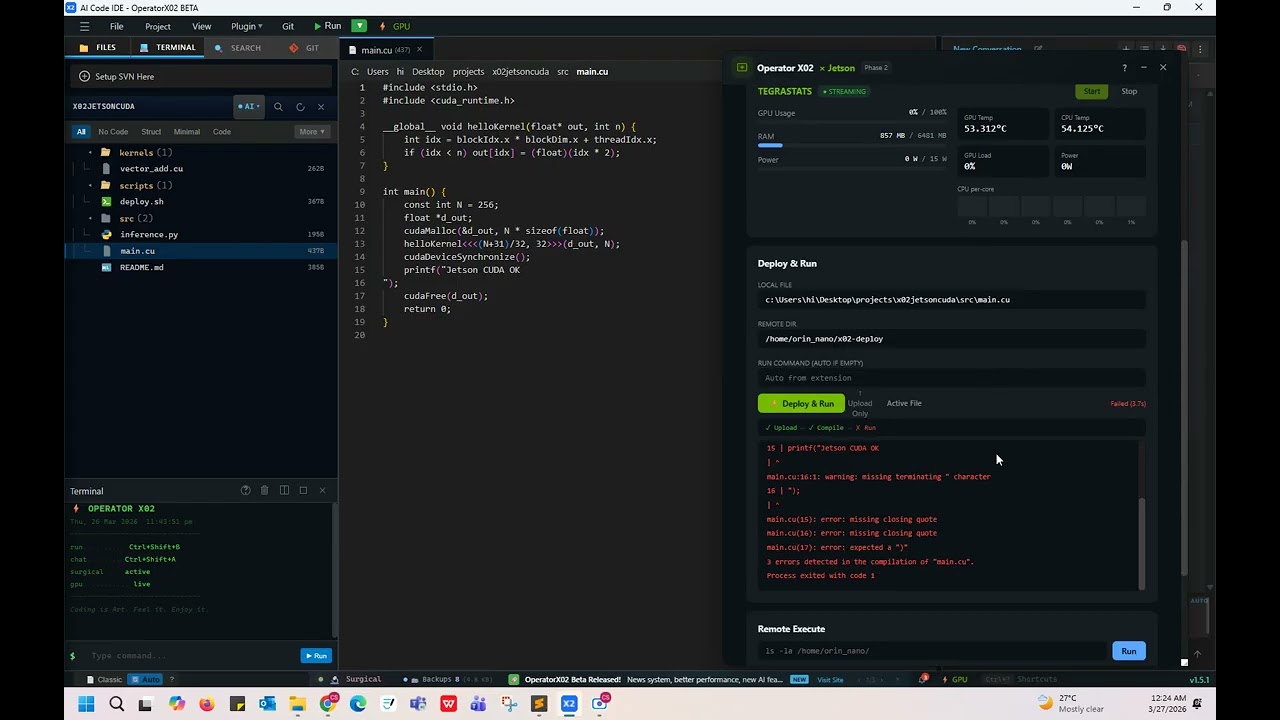
Connect to any Jetson device by IP, port, and credentials directly from the X02 panel. Device info (model, JetPack version, L4T, RAM) is auto-fetched on connect — no terminal commands needed.
One-Click SSH Auto Device Info Orin · NX · AGX
📁
Jetson Project Templates
Scaffold new Jetson projects instantly — CUDA inference, TensorRT pipeline, Python CV2 + Jetson GPIO, and more. Templates are pre-wired for Jetson hardware paths, CUDA toolkit versions, and JetPack library locations.
CUDA Templates TensorRT GPIO · CV2
📊
Real-Time Tegrastats Monitor
Stream live GPU utilization, CPU core loads, board temperatures, power draw, and RAM usage directly from tegrastats. Visual gauges update in real-time with configurable poll intervals.
GPU Util CPU Temps Power Draw RAM
⚙️
GPU Status Bar Widget
A persistent GPU status widget lives in the IDE status bar showing live Jetson GPU utilization at a glance. Detected automatically via the Rust backend when a Jetson connection is active — zero configuration required.
Always Visible Rust Backend Auto Detect
🚀
CUDA File Deployment
Deploy .cu and .py files directly from the editor to your Jetson via SSH. The panel triggers nvcc compilation on-device and streams build output back to X02 in real time.
.cu Deploy .py Deploy nvcc on-device
🛡️
Lag-Aware Streaming Design
The IDE stays responsive during file transfers and tegrastats streaming. The Rust backend manages network round-trips independently so your editor never blocks on SSH I/O — even during large file deploys.
Non-Blocking Deploy Async Rust Backend SCP Transfer
💡
Monaco CUDA Language Support
Full CUDA syntax highlighting and language definitions inside Monaco editor. Write CUDA kernels with proper __global__, __device__, thread indexing, and memory intrinsics — with colour-coded feedback.
CUDA Syntax Monaco Editor Kernel Hints
🤖
AI-Assisted CUDA Editing
Ask Claude, GPT-4, Gemini, or your local Ollama model to write CUDA kernels, explain thread indexing, or optimize memory access patterns — with full file context from your open Jetson project. Bring your own API keys.
Claude · GPT · Gemini Ollama Local CUDA Context Aware
See It In Action

Full Demo —
Jetson Phase 2

Watch X02 connect to a real Jetson Orin Nano, stream live tegrastats telemetry, and deploy a CUDA file — all from inside the IDE.

Operator X02 Jetson Demo
JETSON PHASE 2 DEMO
Operator X02 — SSH · Tegrastats · CUDA Deploy
▶ youtube.com/@csh3003
🔌SSH connect in under 3 seconds
📊Live tegrastats gauges — no terminal
🚀CUDA deploy + nvcc compile on-device
🤖AI assistant in the same window
The Problem We Solved

Before X02 vs After X02

Developing for NVIDIA Jetson used to mean juggling five different tools. V1.5 collapses the entire workflow into one IDE.

BEFORE The Old Workflow
Open terminal, SSH manually each session: ssh nvidia@192.168.x.x
Run tegrastats in a separate terminal window, watch scrolling text
SCP files manually to device, then SSH back in to compile with nvcc
No CUDA highlighting in editor — write kernels in plain C++ mode
Check device model / JetPack version by hand (cat /etc/nv_tegra_release)
Switching between editor, two terminals, and browser docs breaks flow constantly
AFTER With X02 V1.5
Click GPU button → enter IP + credentials → one-click connect from inside X02
Live gauge panel streams GPU%, temperatures, power draw, RAM with visual graphs
Click Deploy → .cu / .py uploaded and compiled on-device, build log streams back
Full CUDA syntax highlighting in Monaco: __global__, warps, thread indexing coloured
Auto device info on connect: model, JetPack, L4T, RAM — displayed instantly
Everything in one IDE window. Editor, AI assistant, Jetson panel, zero context switches
Live Telemetry

Real Hardware.
Real Numbers.

tegrastats data from a real Jetson Orin Nano — GPU utilization, thermal readings, and power consumption rendered as live gauges inside the IDE.

Jetson Orin Nano 192.168.43.109 JetPack 6.0 · L4T 36.3 · 1024-core Ampere
STREAMING
GPU UTIL
74%
GPU TEMP
58°C
CPU TEMP
47°C
POWER DRAW
12.4W
RAM USED
6.2GB
🔍
Field Normalizer
Handles all Rust backend naming conventions — snake_case, camelCase, and alternative names — so tegrastats values always display correctly regardless of firmware version.
gpu_util · gpuUsage · gpu_usage
Configurable Poll Rate
Streaming interval is tunable. Slow it down when monitoring long inference jobs, or speed it up for latency-sensitive benchmarks — all from the panel UI.
Adjustable Interval
🛡️
Lag-Aware Design
The IDE stays responsive during streaming. Close DevTools when not debugging — tegrastats polling adds network round-trips on top of X02's existing background tasks.
Performance Aware
Developer Workflow

From Zero to Deployed Kernel
in Four Steps

1
Connect
Click the GPU icon, enter your Jetson IP + credentials, hit Connect. Device info auto-populates.
192.168.x.x:22
2
Monitor
Hit Start Streaming. GPU%, temperatures, power and RAM gauges come alive in real-time.
tegrastats active
3
Write
Author CUDA kernels with full Monaco syntax highlighting and AI assistance from any provider.
inference.cu
4
Deploy
Click Deploy. File transfers via SSH, nvcc compiles on-device, build log streams back to X02.
nvcc → binary
Under the Hood

What the Panel Actually Does

X02 JETSON PANEL · SSH SESSION LOG
CONNECTED
Jetson Integration Roadmap

Phased Rollout —
Phase 2 Released

NVIDIA Jetson support ships in structured phases. Phase 1 and Phase 2 are live in V1.5. Phase 3 focuses on AI-accelerated edge inference from within the IDE.

PHASE 1
Jetson Aware
✓ SHIPPED
Monaco CUDA language definitions — full kernel syntax highlighting
Jetson project templates — scaffold CUDA, TensorRT, and Python GPIO projects
GPU detection via Rust backend — auto-identifies connected Jetson hardware
GPU status bar widget — always-visible utilization indicator in IDE footer
PHASE 2
Live Control Panel
✓ SHIPPED
SSH panel — one-click connect to any Jetson device by IP:port
Real-time tegrastats streaming — GPU%, CPU%, temps, power, RAM as live gauges
Field normalizer (normStats()) — handles all Rust backend naming conventions reliably
CUDA & Python deploy — transfer + compile on-device, stream build log back
SSH lib migration — ssh2 → russh 0.44 pure Rust, no vendored OpenSSL, faster cold builds
Help overlay — built-in guide with SSH setup, common errors, and requirements
PHASE 3
AI Edge Inference
⏳ COMING NEXT
AI-generated CUDA kernel optimization for Ampere architecture targets
TensorRT model profiler — benchmark inference latency directly from X02
Idle polling suppression — interval manager pauses non-essential loops during streaming
Multi-device management — connect to multiple Jetson nodes in parallel
V1.6 TEASER
Beyond Jetson
◌ ON THE HORIZON
Raspberry Pi Panel — live stats, GPIO control, and deploy from X02 (russh backend already compatible)
Android ADB integration — deploy APKs and stream logcat directly into the IDE
Cross-device workspace — manage Jetson + Pi + Android targets from a unified panel
Surgical Edit Engine improvements — block-level context guards for CUDA kernel rewrites
Download Now

Build for the Edge.
Deploy to Jetson Today.

Operator X02 V1.5 is free and open-source under MIT. Bring your own API keys. No login, no telemetry, no subscription. Just connect your Jetson and code.

MIT License · Windows (Beta) · 95 MB · No account required · Works offline